4 Best Budget Gaming Notebooks With a Real GPU in 2026
The short answer
The best budget gaming notebook pairs an entry to mid-tier current GPU with a dual-fan cooling design. Skip a laptop that cuts cooling to hit a lower price, since it will throttle and feel slower than its spec sheet suggests.
Finding the best budget gaming notebook is not about finding the lowest price. It's about finding the lowest price that still plays your games well. Those are two different searches, and mixing them up is how buyers end up disappointed.
The best budget gaming notebook pairs an entry to mid-tier GPU with real cooling, not just a low price. A dual-fan design matters even more at this price point, since a cheap single-fan chassis throttles fastest under load.
This guide is part of our best gaming laptop guide, which covers every budget band from the bottom of the market up.
These choices use the makers' published specifications and US listings. The four configurations have RTX 5050 or RTX 5060 graphics and at least 16GB of memory. Follow each listing to compare its current complete price, seller and return terms before buying.
#1. ASUS TUF Gaming F16 (RTX 5050): Best Overall Budget Pick
Keep in mind: the 512GB drive and entry-tier GPU mean medium settings and a storage upgrade soon.
The TUF Gaming F16 runs its RTX 5050 at up to 115W, a figure ASUS lists plainly. Its 16-inch screen hits 165Hz and covers 100% of the sRGB color range, and the laptop is tested to MIL-STD-810H. It pairs an Intel Core i5-13450HX with 16GB of DDR5 and a 512GB SSD.
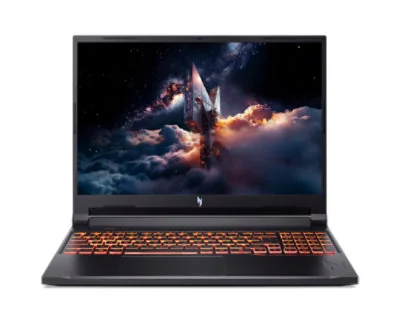
#2. Acer Nitro V 16 (RTX 5050): Best for Storage and Upgrades
Keep in mind: the RTX 5050 is an entry-tier GPU, so new games need medium settings.
The Nitro V 16 pairs an RTX 5050 with an Intel Core 7 240H and a 1TB PCIe Gen 4 drive. Its 16GB of DDR5 sits in two slots with room for up to 32GB, and the 16-inch screen runs at 180Hz. Cooling uses two fans with four intakes and four exhausts.
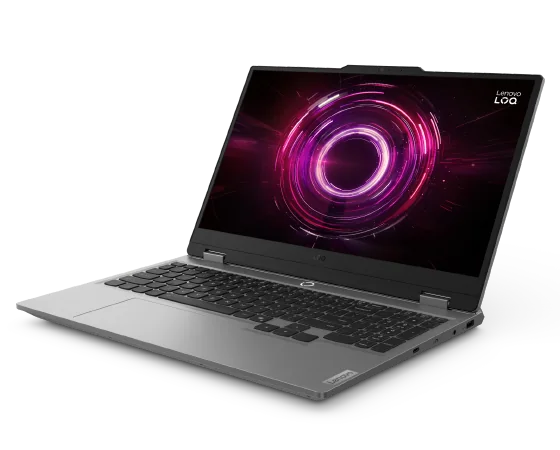
#3. Lenovo LOQ (RTX 5050, 24GB): Most Memory at Entry Level
Keep in mind: the RTX 5050 means medium settings in new games.
This LOQ configuration pairs an RTX 5050 with an AMD Ryzen 7 250, 24GB of DDR5 and a 1TB SSD. Its 15.6-inch 1920 x 1080 IPS screen runs at 144Hz, with 300 nits of brightness and 100% sRGB coverage listed.
Keep in mind: a plain design and a 512GB drive that fills quickly.
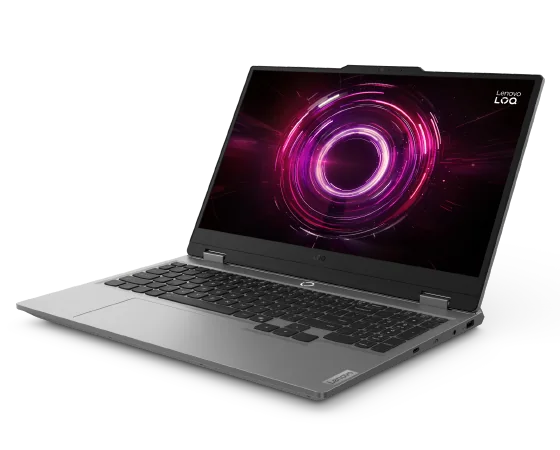
If you can stretch a little, the LOQ 15 moves up to an RTX 5060 with 8GB of GDDR7 video memory, the tier aimed at 1080p gaming in current titles. It has 16GB of DDR5 you can expand to 32GB and a 144Hz screen.
Factors to consider when choosing a budget gaming notebook
Start with the GPU tier and its power limit, not the price tag. Then check for a dual-fan cooling design. That single choice decides how much of the GPU's potential you actually get to use. Confirm the display is at least 120Hz at 1080p.
Finally, check the memory. Walk away from any budget notebook offering less than 16GB, even if the price looks appealing. That single spec affects daily performance more than most other trade-offs at this price point.
Read the warranty terms too. A budget notebook is still a real investment, and a longer warranty can save you money if the cooling system or battery has problems within the first year or two of daily use.
Why Cooling Matters Even More on a Budget Notebook
Brands cut costs somewhere to hit a lower price. Cooling is one of the easiest places to cut. A single fan and a thinner chassis cost less to build.
This is the wrong place to cut for a gaming notebook. Weak cooling makes even a good GPU perform worse. The chip may be capable on paper. It won't show that in practice if it can't stay cool.
A dual-fan design with proper heat pipes helps the GPU run closer to its full speed for longer. Two notebooks can carry the same GPU chip. They can still feel very different after twenty minutes of play. The cooling behind the chip is often the real difference.
This is why reading a review that covers thermals matters more than reading one that only lists the GPU name. A spec sheet alone won't tell you how a laptop handles a long session.
GPU Tier: The Real Budget Line
An entry-tier current GPU is the sweet spot for a budget gaming notebook. So is a mid-tier chip from the last generation. Either option handles most current games at 1080p on medium to high settings.
Going lower than that tier usually means turning down settings on newer, demanding titles. That is still a real gaming experience. It just means fewer visual extras turned on.
Check the exact GPU model and its listed power limit. Don't trust the tier name alone. Two notebooks can list the same GPU name. They can still run it at different power levels. That changes real performance more than the price gap between them suggests.
Display: Don't Settle for 60Hz
A 120Hz or faster screen is now common even at a budget price. There is little reason to accept a 60Hz panel on a dedicated gaming notebook today. A faster screen makes fast games feel noticeably smoother. That matters more day to day than a slightly sharper image.
Resolution matters less at this price tier. The GPU usually can't push high settings at 1440p anyway. A solid 1080p panel with a fast refresh rate is the better use of a limited budget. Chasing a higher resolution instead is usually not worth it here.
Color accuracy is a smaller factor for pure gaming use. It matters more if you also use the notebook for photo or video editing. Check that spec separately if creative work is part of your plan for the machine.
Memory and Storage on a Tight Budget
16GB of memory is the floor worth insisting on. It is worth giving up something else to get there. An 8GB budget notebook will stutter once background apps are open. This happens no matter how strong the GPU is. This one spec matters more than most others at this price.
For storage, 512GB is a workable starting point. It fills up fast with modern game sizes, though. Check whether the notebook supports adding a second drive later. That option can extend its useful life. You won't need to replace the whole machine just to get more space.
Some budget models solder the memory in place, which means you can't upgrade it later. Others use a removable module you can swap for more. Checking this detail before you buy can save you from an expensive replacement down the road.
Battery and Build Quality on a Budget
A budget gaming notebook usually has a smaller battery than a pricier model. Gaming drains it fast on any laptop, since the GPU is the biggest power draw. Expect shorter unplugged gaming time here than on a premium machine.
For everyday tasks like browsing or writing, battery life is often still reasonable. The battery mainly struggles once the GPU is working hard. Keep the charger close if you plan long sessions away from an outlet.
Build quality can vary more at this price than at the premium end. A plastic chassis is common and is not a problem by itself. Check for flex in the keyboard deck and hinge, though, since a wobbly hinge can wear out faster with daily use.
Common Trade-Offs to Expect
A budget gaming notebook usually trades something to hit its price. That might be a lower-resolution webcam, fewer ports, or plainer speakers. None of these usually affect gaming performance directly, so they matter less if gaming is your main use.
Some budget models also use a plainer chassis design compared to premium laptops. This rarely affects performance. It mostly changes how the laptop looks and feels day to day, which is a fair trade for many buyers focused on GPU tier and cooling instead.
Keyboard backlighting is sometimes limited to a single color at this price, rather than the full customizable lighting found on pricier gaming laptops. This is a cosmetic difference only and has no effect on how the laptop actually performs.
Where to Compare Before Buying
Manufacturer spec sheets are the most reliable source for the GPU tier, the memory size and the screen details. Retailer listings sometimes summarize specs loosely, so checking the maker's own page for the exact model can prevent a mismatch between what you expect and what arrives.
Independent reviews that test thermals under a long session are worth reading too, since a spec sheet alone can't show how a laptop behaves after twenty minutes of real gaming. A review that only lists specs without testing them under load tells you less than one that does.
Comparing at least two or three models at a similar price is worth the extra time. Two budget notebooks at the same price can differ in GPU tier and cooling design in ways that matter more than any single headline spec, and the memory size can differ too.
Forums and community discussions can also surface real-world thermal issues that a spec sheet won't mention, such as a specific model that runs hot in one part of the keyboard. Weigh this kind of feedback alongside official specs rather than in place of them. A pattern across several buyer reports carries more weight than a single complaint, since any individual unit can have a one-off issue that isn't typical of the model as a whole.
Ports, Webcam and Small Extras
A budget gaming notebook sometimes trims small extras to hit its price. A lower-resolution webcam is common. This rarely matters for gaming and mostly affects video calls. If calls matter to you for work or school, check this spec on its own rather than assuming it matches the rest of the machine.
Port selection can also be trimmed. Look for at least one full-size USB-C port, a full-size HDMI port, and enough regular USB ports to plug in a mouse and a headset without needing an adapter. Wired ethernet is a helpful extra for online games, since it avoids the small delays that can come with a Wi-Fi connection during a match.
An SD card slot is less common at this price than at the premium end. If you handle photos or video files, check for it specifically rather than assuming every gaming notebook includes one.
Software and Setup Out of the Box
A budget notebook sometimes ships with extra pre-installed software from the manufacturer or retailer. Some of this software is useful, such as a driver update tool. Some of it is just added trial software you may want to remove.
Spend a few minutes after your first setup checking installed programs and removing anything you do not plan to use. This step is free and can make the laptop feel faster from day one, especially on a budget model where every bit of memory and storage matters more.
Keep display and power settings in mind too. Many laptops ship with a power plan tuned for battery life rather than performance. Switching to a balanced or high-performance plan while gaming, and back again for everyday tasks, can noticeably change how the laptop performs and how long the battery lasts.
How Long a Budget Pick Should Last
A well-cooled budget gaming notebook with 16GB of memory and a solid entry to mid-tier GPU can handle current games for a few years before you need to lower settings meaningfully. This is a fair expectation to set going in, rather than assuming a budget machine will feel outdated within months.
A notebook that throttles heavily from day one, on the other hand, tends to feel outdated sooner, even if the GPU tier on paper looks similar to a better-cooled competitor. This is the main reason cooling gets so much attention throughout this guide. It affects how the machine ages, not just how it performs on day one.
Keeping the laptop's software and drivers updated also helps it perform closer to its potential over time. Manufacturers sometimes release updates that improve fan behavior or fix performance issues discovered after launch, so checking for updates every so often is worth the small effort.
Comparing a Budget Notebook to a Desktop
If you have any flexibility on portability, it is worth comparing a budget gaming notebook to a budget desktop at a similar price. A desktop usually delivers more graphics performance for the same money. It does not have to fit a battery, screen and cooling system into one thin case.
A notebook wins when you need to move it between rooms, take it to class, or use it away from home. A desktop wins on raw performance per dollar almost every time. Deciding between the two often comes down to how much that portability is actually worth to you.
Some buyers land on a middle path. They use a budget notebook for portability. They add a separate monitor and keyboard at a desk.
This gives a desktop-like setup at home. It also keeps the laptop free for anywhere else. This setup adds some cost. It can extend how useful the notebook feels day to day.
Setting Realistic Expectations
A budget gaming notebook is not going to match a premium model running the same games at the same settings. That is expected, and it is not a flaw in the budget option. It is simply what the lower GPU tier and cooling budget allow.
The goal with a budget pick is not to match the top of the market. It is to get real, playable performance at a fair price. Judge a budget notebook against that goal. Don't judge it against a laptop twice its price. That mindset leads to a much happier purchase.
Reading a few reviews of the exact model helps too. A review of the wider product family is less useful. A small cooling change between two models in the same line can change results more than the brand name suggests.
Ask friends or online communities about a specific model before buying if you can. Real owners often mention small issues, like a fan that runs loud, that a spec sheet or a short review misses entirely.
A Simple Checklist Before You Check Out
Before adding any budget gaming notebook to your cart, run through a short checklist. First, confirm the exact GPU model, not just the family name. Second, confirm the memory is 16GB or more. Third, confirm the cooling design has two fans rather than one, if the listing says so.
Fourth, check the display refresh rate is at least 120Hz. Fifth, check the storage size against how many games you plan to install at once. Sixth, read the return policy in case the laptop does not match your expectations once you start using it daily.
This short list takes a few minutes to work through per model. It can save you from a purchase that looks good on price alone but falls short on the specs that actually decide how well it plays your games, both today and a year or two from now.
The best budget gaming notebook is not the cheapest one on the shelf. It's the one that pairs a real entry to mid-tier GPU with a dual-fan cooling design and at least 16GB of memory. Skip a lower-priced model that cuts cooling to hit its price, since it will throttle and feel slower than its spec sheet promises once you're a few minutes into a session. Spend the extra effort comparing a few models on those points, and the notebook you land on will keep feeling like a good buy well after the first week, month, and year of daily use. Run through the checklist above one more time before you check out, and you'll avoid the most common regret that buyers report after buying a budget gaming notebook without checking these exact details first.
A budget gaming notebook uses an entry-tier or last-generation GPU rather than the newest, priciest chip. It still targets real 1080p gaming, just at more modest settings than a premium model.
Is 8GB of RAM enough for a budget gaming laptop?
No. 16GB is the realistic floor for current games without stutter. An 8GB model will struggle once you have a browser or chat app open alongside a game.
Should I buy the cheapest gaming laptop I can find?
Not without checking the cooling design first. A very thin, single-fan laptop at a low price often throttles fast, so a slightly pricier model with better cooling can outperform it once you're mid-session.
Do budget gaming notebooks have good screens?
Check the refresh rate and resolution of the exact configuration. A model family can include different panels, so verify the screen in the listing against the maker's specification before buying.
How long should a budget gaming notebook last?
With reasonable care, a well-cooled budget model can handle current games for a few years before you need to lower settings. A model that throttles heavily from day one will feel outdated sooner.