5 Best Laptops for College Students by Major in 2026
As an Amazon Associate, this website earns from qualifying purchases.
The short answer
Pick a laptop that lasts a full day, weighs under about four pounds and has 16GB of memory and 512GB of storage. A MacBook Air suits most majors. Choose Windows for Windows-only course software, and an NVIDIA GPU if you game.
The best laptops for college students have one job: get through a long day of lectures, library sessions and late-night assignments without letting you down. That means battery life and weight matter as much as speed, and the right choice also depends on your major.
Short answer: choose a laptop with all-day battery life, 16GB of memory, at least 512GB of storage and a weight under about four pounds. A MacBook Air suits most majors. Choose Windows for Windows-only engineering or design software, and an NVIDIA GPU if you also game.
This hub names our picks first, then explains how to choose for your major.
#1. Apple MacBook Air 13 (M5): Best for most students
Keep in mind: macOS does not run some engineering and Windows-only course software.
Product details checked September 2026
The MacBook Air 13 with the M5 chip pairs 16GB of memory with a 512GB drive, enough storage for a whole degree, in a light body with all-day battery life. It suits most majors unless your program needs Windows-only software.
Keep in mind: integrated graphics, so it handles light games only.
Product details checked September 2026
The OmniBook 3 16 pairs a Ryzen AI 5 430 with 16GB of memory and a 2K touch screen. HP rates it for more than a full day of light use, which makes it the Windows pick for long campus days.
#3. ASUS Vivobook 16 (Ryzen AI 5 340): Best budget Windows
Keep in mind: the 60Hz screen and integrated graphics are for work, not gaming.
Product details checked September 2026
The Vivobook 16 covers the essentials at a low cost: a Ryzen AI 5 340, 16GB of memory, a 512GB drive and a big 16-inch screen for reading and writing. See our best budget laptop for students guide for more budget picks.
#4. ASUS TUF Gaming A14 (RTX 4060): Best for engineering and gaming
Keep in mind: the memory is soldered, so 16GB is what you keep.
Product details checked September 2026
Engineering software and games both want a dedicated GPU. The TUF Gaming A14 puts an RTX 4060 in a 14-inch body that is still easy to carry. Our engineering students guide covers more options.
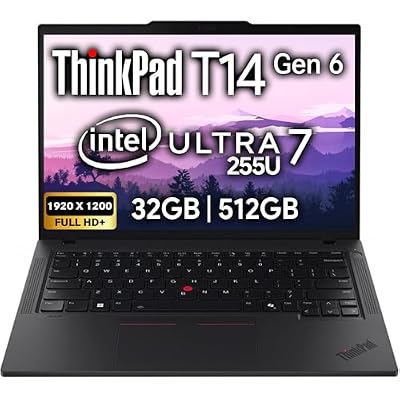
#5. Lenovo ThinkPad T14 Gen 6 (32GB): Best tough business laptop
Keep in mind: integrated graphics only, so no GPU work or modern gaming.
Product details checked September 2026
The ThinkPad T14 Gen 6 brings 32GB of memory, two Thunderbolt 4 ports and a sturdy business build. It suits computer science and business students who want a laptop that survives four years of backpacks.
Factors to consider when choosing a college laptop
Battery. Aim for a laptop rated for a full day. Real use is usually shorter than the rating, so more is better.
Weight. You will carry it every day. Under about four pounds is comfortable; 13 to 14-inch laptops are usually lightest.
Memory. 16GB keeps a browser full of research tabs, a document and a video call running together. 8GB feels slow within a year or two.
Storage. 512GB is the minimum. Cloud storage helps, but offline copies of your work are safer.
Screen. A 13 to 15-inch screen at 1920 x 1200 or sharper is comfortable for reading. A taller 16:10 shape shows more of a page.
Keyboard and webcam. You will type thousands of words. A comfortable keyboard and a decent webcam for online classes both matter.
Ports. USB-C charging is convenient. An HDMI port helps for presentations.
Step 1: Check What Your Program Requires
Before anything else, check your school's and department's recommendations. Some programs require specific software, and some of that software runs only on Windows. Engineering, architecture, film and some science programs are the most likely to have requirements.
Step 2: Match the Best Laptops for College Students to Your Major
The best laptops for college students last a full day, weigh under about four pounds, and have 16GB of memory and 512GB of storage. A MacBook Air is the best fit for most majors. Choose Windows for Windows-only engineering and design software, and a laptop with an NVIDIA GPU if you also game. Check your program's requirements first, then compare the picks above. Younger students and families can start with our laptops for students guide.
The best budget laptops for students in 2026, what cheap laptops cut and what they shouldn't, and four picks with 16GB of memory that will last through school.
For most majors: 16GB of memory, 512GB of storage, all-day battery life and a weight under about four pounds. Engineering, design and film students may need more memory, a dedicated GPU or Windows for specific software.
Is a MacBook or a Windows laptop better for college?
A MacBook suits most majors and has excellent battery life. Choose Windows if your program uses Windows-only software, such as some engineering and CAD tools, or if you want to game on the same laptop.
Should I check with my college before buying a laptop?
Yes. Many schools and departments publish recommended specs or required software for each program. Check those first, especially for engineering, architecture, design and film.
Can one laptop handle college and gaming?
Yes, if it has a dedicated GPU. The trade-off is weight and battery life. A 14-inch gaming laptop is the best compromise for most students.