As an Amazon Associate, this website earns from qualifying purchases.
The short answer
The best gaming laptop for most people is an RTX 5060 model with 16GB of memory and a 144Hz or faster screen, such as the Lenovo LOQ 15. Choose an RTX 5050 machine like the ASUS TUF Gaming F16 if your budget is tight, a 14-inch model like the ASUS TUF Gaming A14 if you carry it daily, and an RTX 5070 Ti or RTX 5080 laptop only if you play at 1440p on high settings.
The best gaming laptop is not the most expensive one. It is the one whose GPU, cooling and screen fit the games you play and the way you carry it. Two laptops at the same price can differ a lot on all three.
This guide does two things. First, it names our current picks for the most common buyers. Then it explains how to judge any gaming laptop yourself, and points you to a deeper guide for your budget or size.
Short answer: get an RTX 5060 laptop with 16GB of memory and a 144Hz or faster screen. The Lenovo LOQ 15 is the value pick. Go down to an RTX 5050 only on a tight budget. Go up to an RTX 5070 Ti or RTX 5080 only if you play at 1440p on high settings.
Keep in mind: a plain design and a 512GB drive that fills quickly.
Product details checked September 2026
The LOQ 15 pairs an RTX 5060 and 8GB of GDDR7 video memory with an AMD Ryzen 7 250. It has 16GB of DDR5 you can expand to 32GB. The 15.6-inch 1920 x 1080 screen runs at 144Hz. It is not flashy, but it puts the money where it counts for 1080p gaming.
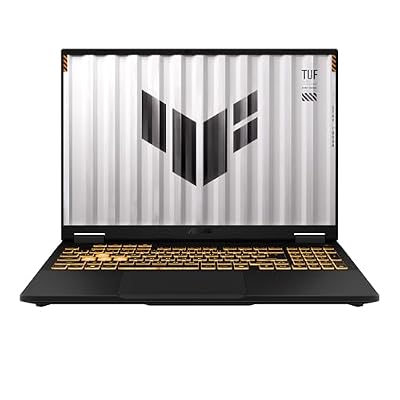
#2. ASUS TUF Gaming F16 (RTX 5050): Best on a Tight Budget
Keep in mind: the 512GB drive and entry-tier GPU mean medium settings and a storage upgrade soon.
Product details checked September 2026
The TUF Gaming F16 runs its RTX 5050 at up to 115W, a figure ASUS lists plainly. Its 16-inch 1920 x 1200 screen hits 165Hz and covers 100% of the sRGB color range. It is tested to MIL-STD-810H for drops and vibration. It suits esports titles and older games, and newer games at medium settings.
Keep in mind: the memory is soldered, so 16GB is what you keep.
Product details checked September 2026
The TUF Gaming A14 puts an RTX 4060 and an AMD Ryzen AI 9 HX 370 in a 14-inch body. The 2560 x 1600 screen runs at 165Hz with G-SYNC. It has a 1TB drive and a second SSD slot. It is the one to pick if the laptop goes in your bag most days.
#4. Alienware 16 Aurora (RTX 5060): Best for On-Site Support
Keep in mind: you pay more for the brand and support than for extra GPU power.
Product details checked September 2026
The Alienware 16 Aurora pairs an RTX 5060 with an Intel Core 7 240H and a 16-inch 2560 x 1600 screen. Dell's Cryo-Chamber cooling design focuses airflow on the main components. The Amazon listing includes one year of Dell on-site service, which means a technician can come to you if a covered fault can't be fixed remotely.
Keep in mind: you pay a premium for the build, and the memory is soldered.
Product details checked September 2026
The 2026 Blade 16 is 14.9mm thick with a CNC aluminum body. It runs an RTX 5070 Ti at up to 140W and has a 16-inch 2560 x 1600 OLED screen at 240Hz. The 32GB of memory is soldered, but there are two M.2 slots for storage.
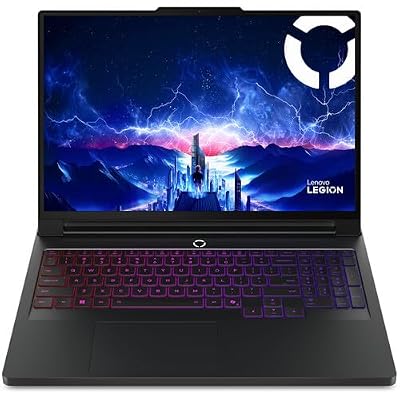
#6. Lenovo Legion Pro 7i Gen 10 (RTX 5080): Best Desktop Replacement
Keep in mind: heavy and power hungry, so it lives on a desk more than in a bag.
Product details checked September 2026
The Legion Pro 7i Gen 10 pairs an RTX 5080 with an Intel Core Ultra 9 and a 16-inch OLED screen. It is built for 1440p at high settings. It is a laptop for a desk, and it only makes sense if you need to move it now and then.
Six checks for narrowing a gaming laptop shortlist
Picks go out of date. The way you judge a gaming laptop does not. These six checks, in this order, will sort almost any shortlist:
GPU tier. It sets the ceiling on what the laptop can run.
GPU power limit. It decides how much of that ceiling you actually get.
Cooling. It decides whether the laptop holds that speed after twenty minutes.
Screen. It decides whether you can see the frames the GPU makes.
Memory and storage. They decide whether the laptop stutters and how many games fit.
Size and weight. They decide whether you will actually carry it.
The sections below explain each one.
Start With the GPU Tier, Not the Price Tag
The GPU is the part that draws the game. It sets the limit on how sharp and smooth a game can look. It is also the part that brands trim first to hit a lower price, while the chassis and marketing stay the same. So the GPU tier tells you more than the price does.
Match the GPU tier to the games and resolution you actually play:
GPU tier
What it suits
Pair it with
RTX 5050 / RTX 4050
Esports titles, older games, newer games at medium settings
A 1080p screen at 144Hz or faster
RTX 5060 / RTX 4060
Current games at 1080p, often at high settings
A 1080p or 1200p screen at 144Hz to 180Hz
RTX 5070
Current games at 2560 x 1600 with some settings lowered
A 2560 x 1600 screen
RTX 5070 Ti / RTX 5080
Current games at 1440p on high settings, with room to spare
A 2560 x 1600 screen at 240Hz
RTX 5090
The most demanding games at the highest settings
The best screen you can find
Scroll for more →
When comparing RTX 4060 and RTX 5050 laptops, check the complete configurations. Look at the screen, GPU power limit, cooling and purchase terms alongside tests of your games. A generation number alone cannot settle which machine meets your needs.
Watch out for video memory too. The GPU has its own memory, separate from the laptop's main RAM. Most RTX 5050 and RTX 5060 laptops have 8GB. Higher tiers carry more, such as 12GB on the RTX 5070 Ti. More video memory helps with high-resolution textures in new games.
Check the GPU Power Limit
This is the spec most buyers miss. The same GPU name can run at very different power levels in different laptops. Makers call this the TGP, or total graphics power. A higher TGP usually means higher frame rates from the same chip.
A thin laptop often runs its GPU at a lower limit to stay cool and quiet. A thicker one can let the same GPU run harder. That is why two laptops with the same GPU name can be far apart in real games.
Good makers list the figure. ASUS lists 115W for the RTX 5050 in the TUF Gaming F16, and Razer lists up to 140W for the RTX 5070 Ti in the Blade 16. If a listing hides the number, check the maker's own spec page before you buy. If two laptops look alike on paper but one costs noticeably more, a higher power limit or better cooling is often the reason.
Cooling Decides Whether That GPU Keeps Its Speed
A strong GPU only helps if the cooling lets it keep running at full speed. When a laptop gets too hot, it lowers its clock speeds to protect itself. This is called throttling. It means a laptop can feel quick in the first few minutes and noticeably slower after twenty.
Look for these signs of real cooling on a spec sheet:
Two fans, not one. Nearly every good gaming laptop uses at least two.
More vents. Acer, for example, lists four intakes and four exhausts on the Nitro V 16.
A vapor chamber on higher-end models. It spreads heat across a wider area than heat pipes alone.
A thicker chassis at the same GPU tier. More room means more airflow.
The best way to judge cooling is a review that tracks performance over a long session, not a single quick benchmark. Our guide to the 16 inch gaming laptop explains why bigger chassis tend to cool better.
Display: Refresh Rate First, Then Resolution
For fast games, refresh rate matters most. A 144Hz screen shows up to 144 frames per second, against 60 on a basic panel. That makes motion look smoother and helps you react sooner. There is little reason to accept a 60Hz screen on a new gaming laptop.
Resolution comes next. A 1920 x 1080 or 1920 x 1200 screen suits the RTX 5050 and RTX 5060. A sharper 2560 x 1600 screen looks better for work and games but asks more of the GPU. It pairs best with an RTX 5070 or higher, or with esports games that already run at high frame rates.
A few more screen specs are worth checking:
Adaptive sync. Features such as G-SYNC match the screen to the GPU's output. That reduces tearing when frame rates dip.
Color range. If you edit photos or video, look for 100% sRGB or 100% DCI-P3. Not every fast panel is accurate.
Brightness. 300 nits is fine indoors. Look higher if you play near windows.
OLED. It gives deeper blacks and stronger HDR, and premium models now use it widely. Static images left on screen for many hours can cause burn-in over time.
Memory and Storage: Don't Undersize Either
16GB of memory is the safe floor for current games. Less than that can cause stutter once a browser, a chat app or a launcher runs in the background. Every pick on this page has at least 16GB.
32GB is worth it if you stream, record gameplay or edit video alongside gaming. Check whether the memory sits in slots or is soldered to the board. Slots let you add more later. The Lenovo LOQ 15 and Acer Nitro V 16 have slots. The ASUS TUF Gaming A14 and Razer Blade 16 are soldered, so you keep what you buy.
For storage, 1TB is the comfortable minimum now that big games take up so much space. A fast PCIe Gen 4 drive shortens load times. If a laptop ships with 512GB, check for a free M.2 slot so you can add a second drive later.
Size, Weight and Battery Trade Off Against Performance
Size changes more than the screen. A bigger chassis has more room for cooling and a bigger battery.
14-inch: easy to carry, but less room for cooling. It can slow down sooner in a long session. Our 14 inch gaming laptop guide covers who should buy one.
15 and 16-inch: the sweet spot for most buyers. Enough room to cool a mid-tier GPU well, and still portable.
17 and 18-inch: desk machines with the most cooling room, but heavy and awkward to carry.
Don't expect long battery life while gaming on any laptop. The GPU draws a lot of power, so play plugged in. Battery life figures on spec sheets usually describe light use like browsing or video, not games.
Ports and Connections Worth Checking
Ports are easy to overlook until you need one. A gaming laptop often ends up connected to a monitor, a mouse, a headset and an external drive at the same time.
HDMI 2.1 lets you run an external monitor or TV at high refresh rates. Most current gaming laptops include it.
USB-C with DisplayPort output gives you a second way to connect a monitor. Some ports also charge the laptop.
Thunderbolt or USB4 ports carry fast data and video, plus power, over one cable. They are useful for docks and fast external drives.
Wired Ethernet gives the steadiest connection for online games. Thin laptops sometimes drop it.
Wi-Fi 6E or Wi-Fi 7 helps if you play online over wireless and your router supports it.
Enough USB-A ports for a mouse, a headset dongle and a controller without a hub.
Check where the ports sit, too. Ports on the back keep cables out of the way of your mouse hand. Ports on the sides are easier to reach when the laptop is on your lap.
Keyboard, Speakers and Webcam
These rarely decide a purchase, but they shape daily use. A full-size keyboard with a number pad is common on 16-inch and larger models. Smaller laptops usually drop the number pad. Key travel and layout matter more than lighting effects, so read how reviewers describe typing if you also write on the laptop.
Laptop speakers are rarely good on any model, and most players use a headset anyway. A 1080p webcam is a small upgrade over 720p if you join video calls for school or work. Face sign-in, such as Windows Hello, is a nice extra on higher-end models.
How to Read a Gaming Laptop Listing
Store listings pack a lot into one long title. Here is how to pull out what matters.
Find the exact GPU. Look for the full name, such as "GeForce RTX 5060 Laptop GPU." If a listing only says "NVIDIA graphics" or "gaming graphics," find out which chip it is before you go further. Some budget listings use a gaming label on a laptop with integrated graphics only.
Find the processor, but don't overweight it. For gaming, a current mid-range processor such as a Core 7, Core i7, Ryzen 7 or similar is plenty. The GPU matters much more.
Check the screen line. You want the screen size first. Then find the resolution and the refresh rate. "FHD" means 1920 x 1080. "FHD+" or "WUXGA" usually means 1920 x 1200. "WQXGA" or "QHD+" usually means 2560 x 1600.
Check memory and storage. Look for "16GB" or more and the type, such as DDR5. Look for the drive size and whether it is "PCIe" or "NVMe," which means a fast solid-state drive.
Watch for bundles and resellers. Some listings are sold by third parties who add extras like hubs or drives, or change the memory. That can be fine, but it can also change the warranty. Check who sells the laptop and who backs the warranty.
Match the model number. The same laptop name often comes in several configurations. Make sure the review you read covers the same GPU and screen as the listing you buy.
Pick by Budget Band
Use the budget bands below to compare sale, open-box and discounted configurations. Check the exact GPU, memory, condition and warranty alongside the price currently shown by the seller. Each band links to a guide with buying checks for that allowance.
Gaming Laptop Under $500
This is the hardest band. Machines here usually pair an older or entry-level GPU with 8GB or 16GB of memory. They handle lighter and older games at 1080p, while newer, demanding games need low settings. Memory and cooling matter more than the GPU name here. Read our gaming laptop under $500 guide before you buy at this level, because many listings in this range carry a gaming label without real gaming hardware.
Best Budget Gaming Notebook
A budget gaming notebook sits a step above the very bottom. The goal is an entry to mid-tier current GPU with a dual-fan cooler. Skip any laptop that cuts cooling to hit a lower price, since it will throttle and feel slower than its spec sheet. Our best budget gaming notebook guide lists the trade-offs worth making and the ones to avoid.
Best Gaming Laptop Under 600
At this level, look for an entry-tier current GPU such as the RTX 4050 or RTX 5050, with 16GB of memory and a dual-fan design. Expect 1080p gaming at medium settings on current titles. Our best gaming laptop under 600 guide explains which corners are safe to cut.
Best Gaming Laptop Under 700
This band opens up better cooling and screens around the same entry GPUs, and sometimes an RTX 5060. Current titles run at 1080p on medium to high settings if the cooling keeps pace. See our best gaming laptop under 700 guide for what to check first.
Best Gaming Laptop Under 800
This is often the sweet spot for 1080p. An RTX 5060 with 16GB of memory and a dual-fan cooler becomes realistic, which means steady high settings in most current games. Our best gaming laptop under 800 guide covers it in depth.
Best Gaming Laptops Under 1000
This band opens up a stronger mid-tier GPU, a faster or sharper screen, and more storage together. It is where 2560 x 1600 gaming starts to become realistic on some titles. Our best gaming laptops under 1000 guide explains where to put the extra money.
Above That
Past the under-1000 band, you are paying for an RTX 5070 Ti, RTX 5080 or RTX 5090, OLED or 240Hz screens, and thinner premium bodies. The Razer Blade 16 and Lenovo Legion Pro 7i Gen 10 in our picks sit here. Only spend at this level if you play at 1440p on high settings or want the laptop to stay fast for many years.
Gaming Laptop Brands: What Each Is Known For
Every major brand sells both well-built and cut-down models, so the specific model matters more than the logo. Still, brands do have patterns:
ASUS covers the full range, from the tough TUF line to the premium ROG line.
Lenovo runs the value-focused LOQ line and the higher-end Legion line.
Acer focuses its Nitro line on budget and mid-range buyers.
HP sells the OMEN line, including the HyperX OMEN models.
Dell sells Alienware, its gaming brand, with service options that can include on-site repair.
Razer sells a small premium range built around thin aluminum bodies.
MSI covers budget to high-end with lines such as Cyborg, Katana and Vector.
A gaming laptop runs hot and gets carried around, so build quality matters. Hinges, fans and batteries take the most wear, and heat adds to it.
A few signs point to a sturdier machine. Metal lids and palm rests flex less than plastic. Hinges that are mounted into the chassis frame, not just the plastic shell, last longer. Cooling that keeps temperatures lower puts less strain on internal parts over years of use.
Some makers test to a military standard. ASUS tests its TUF models to MIL-STD-810H, which covers drops and vibration as well as humidity and heat. That is a useful sign, but it does not make a laptop rugged in the way a field laptop is. Our durable gaming laptop guide explains what to check and what the test labels do and don't mean.
Windows and Software: What to Check
Nearly every gaming laptop ships with Windows 11, and that is the right choice for PC gaming. Most PC games and launchers are built for Windows. The Windows 11 specifications page lists what Microsoft requires, and any current gaming laptop clears it easily.
The software you should check is the maker's own control app. It sets fan speeds, performance modes and the GPU switch that saves battery. A good app lets you pick a quiet mode for study or work and a full-power mode for games. Some laptops also include a MUX switch or NVIDIA Advanced Optimus, which lets the GPU send frames straight to the screen for better performance. Our Windows gaming laptop guide covers the setup steps worth doing on day one.
Gaming Laptop vs Desktop
If the laptop will never leave your desk, think about a desktop first. For the same money, a desktop almost always gives you more graphics power. It doesn't have to fit a GPU, cooling system and battery into a thin case, so its parts can run at full power. It is also easier to upgrade one part at a time.
A laptop wins when you need to move it: between rooms, to school, to work or while traveling. It also saves space, since the screen and keyboard are built in. Our gaming laptop vs desktop comparison goes through the trade-offs in detail.
The Best Gaming Laptop for Your Kind of Use
The right laptop changes with how you use it, not just with budget.
Students. Portability and battery life matter as much as the GPU. A 14-inch or light 15-inch model with an RTX 5050 or RTX 5060 covers evening gaming without weighing down a bag. Soldered memory is a bigger risk here, since the laptop may need to last a whole degree. Our guide to the best laptops for college students looks at this in more depth.
Esports and competitive players. Refresh rate matters most. A 165Hz to 240Hz screen on an RTX 5050 or RTX 5060 often serves these players better than a slower screen with a bigger GPU. A fast keyboard and a wired Ethernet port help too.
Single-player and open-world fans. Resolution, color and GPU tier matter more. A 2560 x 1600 screen with an RTX 5070 or higher shows off detailed worlds. An OLED panel adds contrast in dark scenes.
Creators who also game. Video editing and 3D work lean on memory and video memory. Aim for 32GB of system memory and an RTX 5070 Ti or higher if you can. A color-accurate screen matters. Our best laptops for video editing guide covers the creative side.
Travelers. Weight, charger size and battery life come first. A thin premium model like the Razer Blade 16 carries well but costs more for the same GPU tier. A 14-inch model is lighter still.
Desk gamers. If the laptop rarely moves, go big. A 16 to 18-inch model with the strongest GPU you can afford will cool best. At that point, also price a desktop.
Warranty and Support Are Worth a Look
A gaming laptop is a bigger purchase than most electronics, so read the warranty before you commit. A longer warranty can matter more than a small price difference if a fan or battery fails after a few months of daily use.
Check who handles repairs: the maker or the store. Some listings include extras, such as the one year of Dell on-site service with the Alienware 16 Aurora. Also check whether opening the laptop to add memory or a drive affects the warranty. Many makers allow it, but the rules vary.
How to Make a Gaming Laptop Last
A few habits help any gaming laptop stay fast and healthy for years.
Keep the vents clear. Play on a desk or other hard surface. Soft surfaces like beds and couches block the intake vents and make the laptop run hotter. A simple stand that lifts the back edge can help airflow.
Clean the dust. Dust builds up in fans and heat sinks over time and cuts cooling. A gentle burst of compressed air through the vents every few months helps. If you are comfortable opening the laptop, cleaning the fans directly helps more, but check the warranty first.
Use the right power mode. Use the full-power mode for games and a quieter mode for everyday work. The fans and battery see less strain when the laptop isn't running flat out for no reason.
Look after the battery. Many gaming laptops include a setting that stops charging at a set level when the laptop lives on a desk. Using it can slow battery wear.
Update drivers. New GPU drivers often improve performance and fix bugs in new games. Update them through the NVIDIA app or the maker's own software.
Add memory or storage when you need it. If your laptop has free slots, adding memory or a second drive later is one of the cheapest ways to extend its life.
What About AMD and Intel Graphics?
Most gaming laptops you will find use NVIDIA GeForce GPUs, which is why this guide uses NVIDIA's tiers. AMD and Intel also make laptop graphics, and some gaming laptops use AMD Radeon GPUs. Judge them the same way: find the exact GPU, look up where it sits in its maker's range, and compare it to the NVIDIA tier at the same price.
Be careful with integrated graphics. Many processors include a graphics unit built into the chip. Recent AMD and Intel integrated graphics can run light games, but they are not a substitute for a dedicated GPU in a gaming laptop. If a listing calls a laptop "gaming" but names no dedicated GPU, treat it as an everyday laptop.
Refurbished and Open-Box Gaming Laptops
A refurbished or open-box laptop can stretch your budget up a GPU tier. The risk is in who stands behind it. Refurbished units sold by the maker, or by the store under its own program, often come with a warranty. Units from unknown third-party sellers may not.
Before you buy one, check four things: the warranty length, the return window, the battery condition if it is stated, and whether the exact configuration matches the listing. A used gaming laptop that ran hot for years may have a worn battery and dusty fans, so budget for a cleaning.
Should You Compare RTX 40 Series Laptops?
Often, yes. When a new GPU generation arrives, laptops with the older chips stay on sale for a while. An RTX 4060 or RTX 4070 laptop can still be a strong machine, especially if it has good cooling, a sharp screen and 16GB of memory.
Compare it against the new model at the same tier and size. The newer GPU adds features such as DLSS 4's multi frame generation, which only the RTX 50 series supports. The older laptop may give you a better screen, more storage or a sturdier body for similar money. Our pick for 14-inch buyers, the ASUS TUF Gaming A14, is an example: it uses an RTX 4060 but earns its place with its screen and its size.
Skip older laptops that are two or more generations back unless you only play light games. Their GPUs miss newer features and their batteries may already have sat in storage for a long time.
Common Mistakes When Buying a Gaming Laptop
Buying on GPU name alone. The same GPU at a low power limit in a thin chassis can trail the same GPU in a thicker, better-cooled laptop. Check the power figure and the cooling.
Pairing a big GPU with a small screen, or the reverse. An RTX 5080 on a 1080p screen wastes much of its power. An RTX 5050 on a 2560 x 1600 screen will struggle in new games at full resolution.
Accepting 8GB of memory. It saves money today and causes stutter tomorrow. If the memory is soldered, you can't fix it later.
Forgetting storage. A 512GB drive fills quickly with modern games. Check for a free M.2 slot.
Trusting the word "gaming" in a listing title. Some cheap laptops use the label with integrated graphics only. Look for a named dedicated GPU.
Ignoring weight and charger size. A high-end laptop can weigh well over five pounds with a large power brick. If you carry it daily, that adds up.
Treating brand as a guarantee. Every brand sells strong and weak models. Compare the exact configuration.
Checklist Before You Buy
Run through this list with the exact model and configuration you plan to buy:
The GPU tier matches the games and resolution you play.
The maker lists the GPU power limit, and it isn't unusually low for that GPU.
The laptop has at least two fans and a clear airflow path.
The screen is 144Hz or faster, at a resolution your GPU can drive.
It has 16GB of memory, or 32GB if you create content too.
It has 1TB of storage, or a free slot to add more.
It is a size and weight you will actually carry.
The warranty and support terms suit you.
If a laptop passes every line, it is a good buy at almost any budget.
How the Picks Compare Side by Side
The six picks cover very different buyers, so it helps to see the trade-offs in one place.
Portability. The ASUS TUF Gaming A14 is the easiest to carry, with a 14-inch body. The Razer Blade 16 is 14.9mm thick, so it slips into a bag well for a 16-inch laptop. The Lenovo Legion Pro 7i Gen 10 is the one to leave on a desk.
Screen. The Razer Blade 16 has a 240Hz OLED screen, and the Legion Pro 7i also uses OLED. The TUF A14 and Alienware 16 Aurora use sharp 2560 x 1600 panels. The LOQ 15 and TUF F16 use 1080p-class screens, which suit their GPUs.
Upgrades. The LOQ 15 has memory slots you can fill to 32GB. The TUF A14 and Blade 16 use soldered memory, so you keep what you buy. Most of the picks let you add a second SSD.
Support. The Alienware 16 Aurora listing includes one year of Dell on-site service. The others use the maker's standard warranty, so check the terms for your region.
Gaming Laptop Myths Worth Ignoring
"More RGB means more performance." Lighting has no effect on frame rates. Spend on the GPU and cooling first.
"A newer processor always means faster games." In most games the GPU decides frame rates. A mid-range current processor is enough to keep an RTX 5060 or RTX 5070 busy.
"Thin laptops can't game." Thin laptops can game well, but they often run the GPU at a lower power limit. Check the power figure before you choose a thin model.
"You need 32GB for gaming." 16GB is enough for gaming alone. 32GB helps when you stream or edit video alongside games.
"A gaming laptop lasts as long as a desktop." A laptop's GPU can't be swapped, so plan on replacing the whole machine when games outgrow it. A higher GPU tier at purchase stretches that time.
What a Gaming Laptop Costs to Run
A gaming laptop draws the most power while you play. The GPU and processor both work hard, which is why these laptops ship with large chargers. The LOQ 15, for example, comes with a 245W charger. In light use, such as browsing or writing, power draw is far lower.
A few habits keep running costs and wear down. Use a balanced power mode for everyday tasks. Turn off the screen's highest refresh rate when you aren't gaming. Keep the vents clean so the fans don't run harder than they need to. And unplug the charger from the wall when the laptop is off for long periods.
The best gaming laptop for most people is an RTX 5060 model with 16GB of memory and a 144Hz or faster screen. The Lenovo LOQ 15 fits that brief with memory you can upgrade later. On a tight budget, the ASUS TUF Gaming F16 gets the most from an RTX 5050. If you carry your laptop every day, the 14-inch ASUS TUF Gaming A14 is the better fit. And if you play at 1440p on high settings, compare the Razer Blade 16 for portability with the Lenovo Legion Pro 7i Gen 10 for raw power.
The GPU generation is only one part of the choice. Compare tests of the complete laptop, including its GPU power limit, cooling, screen and the games you play. Check the exact configuration offered by the seller.
Is a 14-inch or 16-inch gaming laptop better?
A 16-inch chassis usually holds a bigger battery and more room for cooling, so it sustains higher clock speeds longer. A 14-inch is lighter for travel but tends to throttle sooner under a long gaming session.
Is a gaming laptop worth it over a desktop?
Only if portability matters to you. For the same money, a desktop almost always delivers more graphics performance, because it doesn't have to fit a GPU, cooling system and battery into a few centimeters of thickness.
How much RAM does a gaming laptop need in 2026?
16GB is the realistic floor for current titles without stutter from background apps. 32GB is worth paying for if you also stream, record footage, or keep a browser and Discord open while playing.
Does screen resolution matter more than refresh rate?
For fast-paced games, refresh rate usually matters more, since a smoother, more responsive screen helps you react quicker than a sharper but slower one. For open-world and story games, sharpness and color accuracy matter more than raw refresh rate.
How long does a gaming laptop last?
It depends on the GPU tier you start with and how you use it. A higher GPU tier stays useful for new games longer. Keeping the vents clean and the laptop on a hard surface helps the fans and battery last.
Which gaming laptop is best for students?
A 14-inch model like the ASUS TUF Gaming A14 is easiest to carry to class. If you mostly game in your room, a 16-inch RTX 5060 laptop gives more cooling. Our college and gaming guide covers this in depth.
Are gaming laptops good for work too?
Yes. A gaming laptop has a fast processor, plenty of memory and a good screen, which suit office work and creative apps. The trade-offs are weight, charger size and shorter battery life.